
Internet Marketing
How to Start a Blog: Ultimate Guide to Launch Success

Last Updated on June 1, 2026 by Ghupto Team
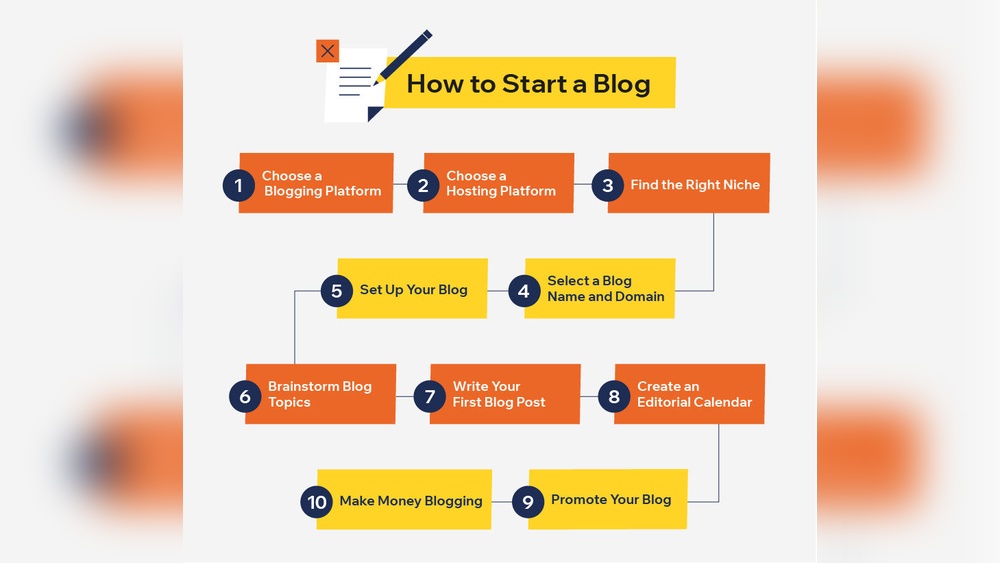
Want to share your ideas, stories, or expertise with the world? Starting a blog is one of the best ways to do just that.
But you might be wondering where to begin or if it’s too complicated. The good news? It’s easier than you think. You’ll find simple, clear steps that guide you through setting up your blog quickly and confidently. By the end, you’ll have everything you need to create a space that’s truly yours.
Ready to take the first step? Let’s dive in.
Credit: blog.hubspot.com
Choosing A Niche
Choosing a niche is the first big step in starting a blog. It shapes your blog’s identity and guides your content. A clear niche helps attract the right readers and keeps you focused. This section explains how to pick a niche that fits your passion, has an audience, and stands out from competitors.
Finding Your Passion
Your blog will grow better if you enjoy the topic. Passion keeps you motivated to create content regularly. Think about what interests you most and what you can talk about for hours. Ask yourself:
- What hobbies or subjects excite me?
- What problems do I like solving?
- What topics do I read about or research often?
Write down your ideas. Narrow the list by choosing topics you know well or want to learn deeply. Your passion makes your blog unique and authentic.
| Advantages of Blogging About Passion | Examples |
|---|---|
| Stay motivated longer | Fitness, cooking, travel |
| Share personal experience easily | Parenting, tech gadgets, photography |
| Create unique content | DIY crafts, book reviews, gaming |
Researching Market Demand
After finding your passion, check if people want to read about it. Market demand means the audience size interested in your niche. High demand means more readers and potential income. Use tools like Google Trends or keyword planners to see popular searches.
- Search for your topic and related keywords
- Check search volume and trends over time
- See if people ask questions or look for solutions
Also, look at social media groups or forums. Are people active and engaged in discussions on your topic? If yes, that shows a strong market demand.
Here is a simple checklist for market demand research:
- Use keyword tools to find search volume above 1,000 monthly searches
- Observe steady or rising interest in Google Trends
- Find active online communities and forums
- Look at popular blog posts or videos in the niche
Evaluating Competition
Competition means other blogs and websites in your niche. A little competition is good. It shows people care about the topic. Too much competition makes it hard to rank on search engines. Too little may mean no interest. Balance is key.
Check the top blogs in your niche by searching keywords on Google. Study these points:
- How many blogs cover your topic?
- How strong is their content quality?
- Are they active with new posts?
- What unique angle do they use?
Use this table to compare competitors:
| Blog Name | Content Quality | Posting Frequency | Unique Angle |
|---|---|---|---|
| Example Blog A | High – detailed guides | Weekly | Focus on beginners |
| Example Blog B | Medium – basic tips | Monthly | Personal stories |
| Example Blog C | High – expert interviews | Weekly | Industry news |
This research helps you find your niche’s gap. Offer something different or better. Your unique voice and approach attract readers despite competition.
Picking A Blogging Platform
Choosing the right blogging platform is a key step in starting your blog. It shapes how you write, design, and share your ideas. Picking a platform affects your blog’s look, control, and growth potential. Some platforms are simple and ready to use. Others offer more tools but need more work. Understanding your options helps you find the best fit for your needs and goals.
Popular Platforms Overview
Many blogging platforms exist, each with unique features and audiences. Here are some popular ones:
- WordPress.org: A self-hosted option with full control and many plugins.
- WordPress.com: Hosted platform with easy setup but fewer customization options.
- Blogger: Free and simple, owned by Google, good for beginners.
- Wix: Drag-and-drop website builder with blog features.
- Squarespace: Stylish templates and built-in tools, good for visual content.
- Medium: Focuses on writing and community, less design control.
Here is a quick comparison table:
| Platform | Cost | Control | Ease of Use | Best For |
|---|---|---|---|---|
| WordPress.org | Hosting cost | Full control | Moderate | Serious bloggers |
| WordPress.com | Free or paid plans | Limited | Easy | Beginners |
| Blogger | Free | Limited | Easy | Casual bloggers |
| Wix | Free or paid plans | Moderate | Very easy | Small business |
| Squarespace | Paid | Moderate | Easy | Creative blogs |
| Medium | Free | Very limited | Very easy | Writers |
Self-hosted Vs Hosted Options
Blogging platforms split into two main types: self-hosted and hosted. Each suits different needs.
Self-hosted platforms require you to buy hosting and install software. WordPress.org is the best example. It offers full control over design, plugins, and content. You own your data and can monetize freely. But, it needs technical skills to manage updates and security.
Hosted platforms handle hosting and maintenance for you. WordPress.com and Blogger are examples. They are easier to start, with setup and updates done automatically. These platforms limit customization and control. Monetization options may be restricted.
Here is a quick comparison:
| Feature | Self-Hosted | Hosted |
|---|---|---|
| Setup | Requires installation | Ready to use |
| Customization | Full control | Limited |
| Maintenance | User’s responsibility | Platform handles it |
| Cost | Hosting fee | Free or subscription |
| Monetization | Unlimited | Restrictions apply |
Choose self-hosted for full control and growth. Choose hosted for ease and less tech work.
Ease Of Use And Customization
Ease of use helps you start quickly and enjoy blogging. Customization lets you make your blog look unique and fit your style.
Hosted platforms like Blogger and WordPress.com offer simple editors. They include ready themes and drag-and-drop builders. No coding is needed. These platforms suit beginners who want a fast start without tech hurdles.
Self-hosted platforms like WordPress.org allow deep customization. You can install thousands of themes and plugins. You can change code for advanced design. This option is best for users who want full control and can handle some technical tasks.
Consider these points:
- Learning curve: Hosted platforms are easier for beginners.
- Design options: Self-hosted platforms offer more themes and plugins.
- Functionality: Add features like e-commerce, SEO tools, and social media integration on self-hosted platforms.
- Maintenance: Hosted platforms update automatically; self-hosted needs manual updates.
Ease of use and customization should match your skills and blog goals. Start simple and grow as you learn.
Selecting A Domain Name
Starting a blog begins with picking the right domain name. This name is your blog’s identity on the internet. It should reflect your blog’s topic and be easy for visitors to remember. A well-chosen domain name helps attract readers and build trust. Spend time on this step to make your blog stand out and grow.
Choosing A Memorable Name
Choose a domain name that sticks in people’s minds. A memorable name is simple, short, and easy to say out loud. Avoid long or complex words that confuse readers or are hard to spell.
Here are some tips for choosing a good name:
- Keep it short: Aim for 6-14 characters.
- Use keywords: Include words related to your blog’s topic.
- Avoid numbers and hyphens: These can be confusing and hard to remember.
- Make it unique: Stand out from other blogs in your niche.
- Easy to pronounce: So visitors can talk about your blog easily.
Example of good domain names:
| Domain Name | Why It Works |
|---|---|
| HealthyBites.com | Short, clear, related to food and health |
| TravelNest.com | Easy to say, travel-related, unique |
| CodeCrafts.com | Simple, tech-related, catchy |
Write down several ideas. Say them out loud. Choose the one that feels right and fits your blog’s goal.
Checking Availability
After choosing a few names, check if they are available to use. Many domain names are already taken. Use online tools to find out if your name is free.
Here are ways to check domain availability:
- Use domain registrars like GoDaddy, Namecheap, or Google Domains.
- Try typing your name with different extensions like .com, .net, or .blog.
- Check social media sites to see if the name is used there.
Tips for this step:
- Pick a .com domain if possible. It is the most trusted extension.
- Have backup names ready if your first choice is taken.
- Avoid names that are too similar to famous brands to prevent legal issues.
Example of domain extensions:
| Extension | Usage | Popularity |
|---|---|---|
| .com | Commercial sites, blogs | High |
| .net | Network or tech sites | Medium |
| .blog | Personal or professional blogs | Growing |
Take your time to verify availability. It saves trouble later and protects your brand.
Registering Your Domain
Once you find an available domain name, register it quickly. This process secures your blog’s web address and prevents others from taking it.
Steps to register your domain:
- Choose a trusted domain registrar.
- Create an account on their site.
- Enter your chosen domain name to confirm availability.
- Add the domain to your cart and proceed to checkout.
- Provide your contact information accurately.
- Decide if you want extra privacy protection to hide your personal info.
- Complete the payment to finish registration.
Common domain registrars:
- GoDaddy
- Namecheap
- Google Domains
- Bluehost
Remember: Domains usually renew every year. Set up automatic renewal to avoid losing your domain.
Register your domain as soon as possible to keep your blog’s identity safe. This step is essential for building your online presence.
Credit: writingexplained.org
Setting Up Web Hosting
Setting up web hosting is a key step in starting a blog. It means renting space on the internet where your blog files live. Without hosting, no one can see your blog online. Choosing the right hosting service helps your blog load fast and stay online all the time. This section explains the main types of hosting, how to pick a good provider, and how to set up your hosting account properly.
Types Of Hosting Services
Web hosting comes in different types. Each type fits different blog needs and budgets. Below are the most common hosting types:
- Shared Hosting: Many websites share one server. It is cheap and easy to use. Good for small blogs with low traffic.
- VPS Hosting: Virtual Private Server gives you a part of a server. More power and control than shared hosting. Suitable for medium blogs.
- Dedicated Hosting: You get a whole server to yourself. Best for large blogs with high traffic. It costs more but offers full control.
- Cloud Hosting: Uses many servers to host your site. It is flexible and scales with your blog’s traffic. Good for growing blogs.
- Managed WordPress Hosting: Special hosting for WordPress blogs. The host handles updates and security. Great for beginners.
Here is a quick comparison:
| Hosting Type | Cost | Performance | Best For |
|---|---|---|---|
| Shared Hosting | Low | Basic | New, small blogs |
| VPS Hosting | Medium | Good | Growing blogs |
| Dedicated Hosting | High | Excellent | Large, high-traffic blogs |
| Cloud Hosting | Medium to High | Flexible, scalable | Blogs with fluctuating traffic |
| Managed WordPress Hosting | Medium | Optimized for WordPress | Beginners, WordPress users |
Evaluating Hosting Providers
Choosing a good hosting provider affects your blog’s speed and uptime. Here are key points to check:
- Reliability: Look for 99.9% uptime guarantee. This means your blog stays online almost all the time.
- Speed: Fast servers help visitors load pages quickly. Check if the host uses SSD storage and has data centers near your audience.
- Customer Support: 24/7 support is best. Live chat and phone support help solve problems fast.
- Backup Options: Regular backups protect your blog data from loss.
- Security: Features like SSL certificates, firewalls, and malware scanning keep your blog safe.
- Pricing: Compare prices and what is included. Watch for renewal fees that can be higher.
- User-Friendly Control Panel: Easy-to-use dashboards help you manage your hosting without tech skills.
Check reviews and ratings from other users. Good feedback often shows reliable providers.
Configuring Your Hosting Account
After choosing a provider, setting up your hosting account is next. Follow these steps:
- Sign Up: Create an account on the hosting provider’s website. Choose a plan that fits your blog needs.
- Choose a Domain: Register a domain name or use one you already own. The domain is your blog’s web address.
- Set Up Nameservers: Point your domain to the hosting servers by changing nameservers. Your host will provide these details.
- Install Blogging Software: Use one-click installers to add WordPress or other platforms. This simplifies blog setup.
- Configure Email: Create email accounts linked to your domain for professional contact.
- Enable SSL: Activate SSL certificates for secure browsing. Many hosts offer free SSL via Let’s Encrypt.
- Set Up Backups: Schedule automatic backups to protect your blog content.
Most hosting providers have guides and support to help with each step. Spend time exploring your hosting control panel. It helps manage your blog smoothly.
Designing Your Blog
Designing your blog is a key step after setting up the basics. A well-designed blog attracts readers and keeps them engaged. It shows your style and makes your content easy to read. Good design is not just about looks; it helps visitors find what they want quickly. Start by choosing the right theme or template. Then, customize your blog’s layout and colors to match your personality or brand. Don’t forget about mobile users. Your blog must look good and work well on phones and tablets. This section guides you through these important design choices to create a blog that stands out.
Choosing A Theme Or Template
Picking the right theme or template sets the foundation for your blog’s design. Themes control how your blog looks and feels. Many blogging platforms offer free and paid themes. Choose one that fits your blog’s topic and style. For example, a photography blog needs a theme that shows pictures well. A writing blog may focus on clean text and easy reading.
Consider these points when selecting a theme:
- Simple and clean design: Avoid clutter. Simple themes load faster and look better.
- Good readability: Fonts should be easy to read on all devices.
- Fast loading: Choose themes that don’t slow down your site.
- Regular updates: Themes updated often are more secure and compatible.
Here is a quick comparison of common theme types:
| Theme Type | Best For | Pros | Cons |
|---|---|---|---|
| Minimalist | Text blogs, portfolios | Fast, clean, easy to read | Less flashy design |
| Magazine | News, multi-topic blogs | Organized, many sections | Can be busy or slow |
| Photography | Photo blogs, portfolios | Large image displays | May hide text content |
Tip: Preview themes before activating them. Check how they look on different devices.
Customizing Layout And Colors
After choosing a theme, customize your blog’s layout and colors. The layout controls where text, images, and menus appear. Good layout guides visitors to important content.
Here are steps to customize layout:
- Decide on the blog structure: single column, two columns, or grid.
- Place the menu where it is easy to find.
- Add widgets like search bars or recent posts to the sidebar or footer.
- Use white space to avoid crowding.
Colors affect mood and readability. Use a simple color palette with 2-3 main colors. Follow these tips:
- Choose a background color that does not strain the eyes.
- Use dark text on a light background for easy reading.
- Highlight links and buttons with a bright accent color.
- Keep colors consistent across all pages.
Example of a simple color scheme:
| Element | Color | Purpose |
|---|---|---|
| Background | FFFFFF (white) | Clean and neutral |
| Text | 333333 (dark gray) | Easy to read |
| Links/Buttons | 0073AA (blue) | Stand out clearly |
Use your blog platform’s customization tools to make changes. Preview often to see how changes look on different screens.
Ensuring Mobile Responsiveness
Many readers use phones or tablets to visit blogs. Mobile responsiveness means your blog looks good and works well on all screen sizes. Responsive design changes the layout automatically to fit smaller screens.
Here is why mobile responsiveness matters:
- Improves user experience on small devices.
- Helps your blog rank better in search engines.
- Increases visitor time and lowers bounce rates.
Check if your theme is mobile responsive:
- Use the “Preview” option on your blogging platform.
- Resize your browser window and see if content adjusts.
- Test your blog on actual phones and tablets.
Some tips to improve mobile responsiveness:
- Avoid very large images that slow loading.
- Use large buttons and links easy to tap.
- Keep menus simple and easy to open.
- Limit pop-ups that cover the screen.
Here is a simple code snippet to make images responsive:
img { max-width: 100%; height: auto; }This code makes images shrink to fit smaller screens without distortion.

Credit: www.wix.com
Creating Content
Creating content is the heart of starting a blog. It shapes your voice and connects you with readers. Good content keeps visitors coming back and helps your blog grow. Focus on clear, useful, and interesting posts. Plan your topics well and present them in a way that is easy to read. Content should solve problems or share stories that matter to your audience. This section covers how to plan, write, and enhance your blog posts for better impact.
Planning Your Content Strategy
Planning your content strategy sets the foundation for your blog’s success. Start by defining your blog’s main topics. Choose subjects you know well and enjoy writing about. This keeps your content authentic and consistent.
Create a content calendar to organize your posts. It helps you post regularly and cover all important topics over time. Here is a simple table to guide your planning:
| Step | Action | Tip |
|---|---|---|
| 1 | Choose blog topics | Focus on your interests and audience needs |
| 2 | Research keywords | Use simple tools like Google Keyword Planner |
| 3 | Create a content calendar | Plan posts weekly or monthly |
| 4 | Set goals for each post | Inform, entertain, or persuade readers |
Keep your audience in mind. Think about their questions and problems. Write content that answers those clearly. Use short sentences and simple words to make it easy to understand. Consistency in your content builds trust and helps your blog grow faster.
Writing Engaging Posts
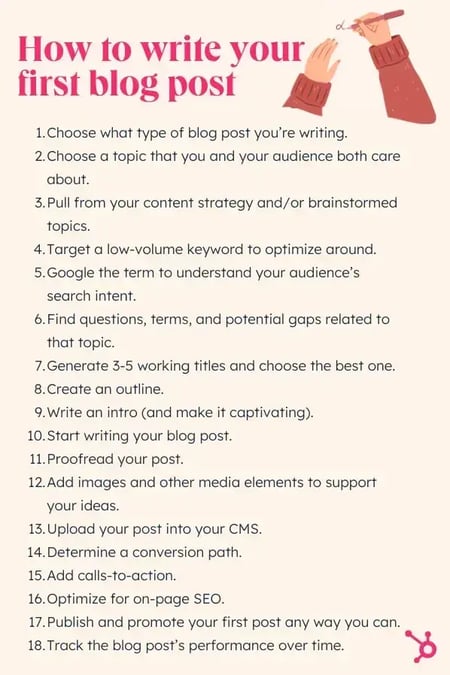
Writing posts that hold readers’ attention is key. Start with a strong introduction that tells what the post is about. Use a friendly and clear tone. Break your content into small paragraphs to make it easier to read.
Use these tips to write engaging posts:
- Ask questions to involve readers.
- Use examples or stories to explain ideas.
- Include lists or bullet points for easy reading.
- Write short sentences to keep it simple.
- End with a clear message or call to action.
Editing is important. Check your post for spelling and grammar mistakes. Read it out loud to catch awkward sentences. This improves the flow and makes your writing stronger.
Here is a simple outline to follow for each post:
- Title: Clear and interesting
- Introduction: What the post covers
- Main content: Key points with examples
- Conclusion: Summary or next steps
Using Multimedia Elements
Adding images, videos, or charts makes your posts more attractive and easier to understand. Multimedia helps explain ideas better and keeps readers interested longer.
Use these types of multimedia:
- Images: Photos, illustrations, or infographics
- Videos: Tutorials or short clips
- Charts and graphs: Show data visually
Make sure your multimedia is relevant to the post’s topic. Use captions to explain images or videos. Keep file sizes small so your blog loads quickly.
Here is a quick checklist for using multimedia:
| Checklist | Reason |
|---|---|
| Use high-quality images | Looks professional and clear |
| Add alt text | Helps with SEO and accessibility |
| Keep videos short | Maintains reader attention |
| Use consistent style | Creates a uniform look across posts |
Combining text with multimedia makes your blog posts richer. It helps readers learn and enjoy your content more. Use these tools wisely to improve your blog’s quality and reach.
Promoting Your Blog
Starting a blog is exciting, but promoting it is what brings readers to your content. Without promotion, your posts may go unnoticed. Effective promotion helps your blog grow and reach the right audience. Focus on simple and smart strategies to share your blog widely. Below are key ways to promote your blog successfully.
Leveraging Social Media
Social media platforms are powerful tools to share your blog posts and attract readers. Use platforms like Facebook, Twitter, Instagram, and LinkedIn to connect with people interested in your topics. Post regularly to keep followers engaged and remind them about your content.
- Create engaging posts: Use images, short descriptions, and questions to catch attention.
- Join groups and communities: Share your blog in groups related to your niche.
- Use a posting schedule: Plan your posts to appear consistently at the best times.
- Interact with followers: Reply to comments and messages to build relationships.
Here is a simple table showing the best social media platforms for different blog types:
| Blog Type | Best Platforms |
|---|---|
| Fashion & Lifestyle | Instagram, Pinterest, Facebook |
| Tech & Business | LinkedIn, Twitter, Facebook |
| Food & Travel | Instagram, Facebook, Pinterest |
| Personal & Creative | Facebook, Instagram, Twitter |
Use social media tools like scheduling apps to save time. Keep posts short and clear. Always include a link to your blog to drive traffic.
Building An Email List
An email list lets you reach readers directly. People who subscribe want to hear from you. This makes email a strong way to share new posts and updates. Start collecting emails early to grow your blog audience.
Follow these steps to build your email list:
- Add signup forms: Place forms on your homepage and blog posts.
- Offer a freebie: Give a free guide, checklist, or ebook in exchange for emails.
- Send regular newsletters: Share new posts, tips, or special content.
- Keep emails short and helpful: Readers appreciate clear and useful messages.
Here is a sample structure for a welcome email to new subscribers:
Subject: Welcome to [Your Blog Name]! Hi [Name], Thanks for joining our community! Expect helpful tips and new blog posts every week. To start, check out our most popular post: [Link] See you soon, [Your Name] Use email marketing services like Mailchimp or ConvertKit. These tools help you manage your list and send emails easily.
Networking With Other Bloggers
Connecting with other bloggers builds support and can increase your blog’s reach. Bloggers in your niche share similar interests and audiences. Working together benefits everyone involved.
- Comment on other blogs: Leave thoughtful comments to start conversations.
- Guest post on other blogs: Write articles for others to reach new readers.
- Invite guest bloggers: Let others post on your blog to add variety.
- Join blogging groups: Use online forums or social media groups to meet bloggers.
Networking can lead to collaborations like:
- Co-hosted webinars
- Shared giveaways
- Social media shoutouts
Keep relationships genuine and helpful. Support others by sharing their posts and giving honest feedback. This builds trust and grows your blogging community.
Monetizing Your Blog
Starting a blog is exciting, but making money from it is the real goal for many. Monetizing your blog means turning your passion into income. There are several ways to do this. Choose methods that fit your blog’s style and audience. This guide explains three popular ways to earn money from blogging: affiliate marketing, sponsored content, and selling products or services.
Affiliate Marketing
Affiliate marketing lets you earn money by promoting other people’s products. When readers buy through your links, you get a commission. This method is popular because it requires little upfront cost and works well with many blog topics.
To succeed with affiliate marketing:
- Choose products related to your blog’s theme.
- Join trusted affiliate programs like Amazon Associates, ShareASale, or CJ Affiliate.
- Write honest reviews or create helpful guides using affiliate links.
- Disclose your affiliate relationships to build trust.
Here is a simple example of how affiliate marketing works:
| Step | Action | Result |
|---|---|---|
| 1 | Join affiliate program | Get unique tracking links |
| 2 | Promote products on your blog | Readers click your links |
| 3 | Reader buys product | You earn commission |
Affiliate marketing works best when you provide value and choose products your audience will like. It’s a passive income source that grows as your blog grows.
Sponsored Content
Sponsored content means a company pays you to write about their product or service. It suits blogs with good traffic and loyal readers. Brands want exposure, and your blog can offer that.
Key points for sponsored content:
- Keep content honest and clear. Readers appreciate transparency.
- Focus on products your audience finds useful.
- Negotiate payment before writing.
- Follow your country’s rules about paid content disclosure.
Here’s what a sponsored post process looks like:
- Brand contacts you or you pitch to brands.
- You agree on topic, price, and deadlines.
- You write the post and include brand messages.
- You publish and share the post.
Sponsored content helps you earn by sharing paid stories that match your blog’s voice. It builds relationships with brands and adds income without extra products.
Selling Products Or Services
Selling products or services through your blog offers direct income. You can create physical goods, digital downloads, or offer services like coaching or writing. This method suits blogs with a clear focus and engaged readers.
Consider these steps:
- Identify what your audience needs or wants.
- Create or source quality products or services.
- Use your blog to explain benefits and how to buy.
- Set up an easy payment system (PayPal, Stripe).
- Offer good customer service to keep buyers happy.
Common products and services bloggers sell:
| Type | Examples |
|---|---|
| Physical Products | Books, crafts, merchandise |
| Digital Products | E-books, courses, printables |
| Services | Consulting, coaching, freelance writing |
Selling directly gives full control over your income. It requires effort but builds a strong connection with your readers.
Maintaining Your Blog
Starting a blog is just the first step in your online journey. Maintaining your blog is crucial to keep your audience interested and your site running smoothly. Regular care helps your blog grow and stay safe from problems. This section explains how to maintain your blog effectively.
Regular Updates And Backups
Keeping your blog updated and secure is very important. Updates improve your site’s performance and protect it from security threats. Always update your blogging platform, themes, and plugins.
- Schedule updates weekly or biweekly to avoid missing important fixes.
- Test updates on a staging site if possible, to prevent problems on your live blog.
Backups are your safety net. They help you recover your blog if something goes wrong. Set up automatic backups and store them in different places, like cloud storage or an external drive.
| Backup Type | Frequency | Storage Options |
|---|---|---|
| Full Backup | Weekly | Cloud storage, External drive |
| Database Backup | Daily | Cloud storage, Email |
Tip: Use plugins or hosting services that offer easy backup solutions. This saves time and reduces errors.
Monitoring Analytics
Tracking your blog’s performance helps you understand your visitors and what content works best. Use tools like Google Analytics to see key data such as:
- Number of visitors
- Most popular posts
- Visitor location
- Time spent on site
- Sources of traffic (search engines, social media, etc.)
Check your analytics regularly. Look for patterns and changes. This information guides your content and marketing strategies.
Here is a simple way to use analytics data:
- Identify your top 3 posts by views.
- Write similar content or update old posts.
- Improve posts with low engagement by adding images or clear headings.
- Focus on traffic sources that bring the most visitors.
Note: Set goals for your blog, like increasing visitors or newsletter sign-ups. Use analytics to measure progress.
Engaging With Readers
Building a connection with your readers creates loyalty and encourages return visits. Respond to comments on your posts quickly and politely. Show appreciation for feedback and answer questions clearly.
Use these methods to engage your audience:
- Ask questions at the end of posts to invite comments.
- Run polls or surveys to learn reader preferences.
- Share readers’ comments or stories with permission.
- Create a newsletter to send updates and special content.
Engagement helps build a community around your blog. It also improves your blog’s visibility on search engines.
Remember: Respect different opinions and keep discussions friendly. Consistent communication turns visitors into loyal readers.
Frequently Asked Questions
What Is The First Step To Start A Blog?
The first step is choosing a niche you are passionate about. Next, select a blogging platform like WordPress or Blogger. Finally, register a domain name that reflects your blog’s topic.
How Much Does It Cost To Start A Blog?
Starting a blog can cost between $50 to $200 annually. This covers domain registration, hosting, and premium themes or plugins. You can start with free platforms but paid options offer better control and professionalism.
How Do I Choose The Best Blogging Platform?
Consider ease of use, customization options, and cost when choosing a platform. Popular choices include WordPress, Wix, and Squarespace. WordPress is ideal for flexibility, while Wix suits beginners with drag-and-drop features.
How Often Should I Publish Blog Posts?
Publishing consistently is key; aim for at least one post per week. Regular updates keep readers engaged and improve SEO. Quality matters more than quantity, so focus on valuable content.
Conclusion
Starting a blog is easier than you might think. Choose a topic you enjoy and know well. Pick a simple platform to create your site. Write regularly and share your ideas clearly. Engage with readers and learn from feedback. Over time, your blog will grow and improve.
Keep your goals in mind and stay patient. Blogging can be a fun and rewarding journey. Ready to begin? Your story is waiting.

How Many Seconds in a Day: Unveiling the Exact Number

How Many NBA Players Are Jehovah Witnesses: Surprising Facts

How to Start a Blog: Ultimate Guide to Launch Success

How Long Do Idiots Live: Surprising Facts and Myths Explained

Why is the Moon Low And Orange Tonight: Causes and Meanings

How Many Jobs are Available in Public Utilities: 2026 Guide

Start A Blogging Guide: How To Build An Effective Blog

Which TEFL Level Should I Choose?

How to Learn Spanish and Become Fluent as an Adult

10 Best Places To Teach English Abroad And Save Money

10 Free Plus Size Clothing Catalogs That You Can Request Online

List of 100 High Authority Free Guest Blogging Sites that Bring You Success on The Web

The Secret of Link Building Strategies That Works For Every Major Search Engines

How to Start A Blog in 2022 : Step by Step Guide for Beginners

10 Free Junior Clothing Catalogs That You Can Get at Home

Methods To Building Your Email List from Blogging

8 Clothing Catalogs for Women That You Can Get for Free

Free Clothing Catalogs That’ll Help You Follow the Latest Fashion Trends

9 Free Kids Clothing Catalogs for Your Little Ones

The Complete Guide to Australia’s Magnetic Island
How Many Seconds in a Day: Unveiling the Exact Number
How Many NBA Players Are Jehovah Witnesses: Surprising Facts
How to Start a Blog: Ultimate Guide to Launch Success
10 Free Plus Size Clothing Catalogs That You Can Request Online
List of 100 High Authority Free Guest Blogging Sites that Bring You Success on The Web
The Secret of Link Building Strategies That Works For Every Major Search Engines
-
 Cloth9 years ago
10 Free Plus Size Clothing Catalogs That You Can Request Online
-
 Search Engine Optimization9 years ago
List of 100 High Authority Free Guest Blogging Sites that Bring You Success on The Web
-
 Search Engine Optimization9 years ago
The Secret of Link Building Strategies That Works For Every Major Search Engines
-
 Blogging5 years ago
How to Start A Blog in 2022 : Step by Step Guide for Beginners
-
 Cloth9 years ago
10 Free Junior Clothing Catalogs That You Can Get at Home
-
 Email Marketing9 years ago
Methods To Building Your Email List from Blogging
-
 Cloth9 years ago
8 Clothing Catalogs for Women That You Can Get for Free
-
 Cloth9 years ago
Free Clothing Catalogs That’ll Help You Follow the Latest Fashion Trends